Learn Together
The Basics Building Community Discussion Board
Basics
This section is a resource to refresh your understanding of some of the basics of Moodle and Zoom. The goals of this section are to:
- Provide quick refreshers on commonly used features
- Link to articles for tips on teaching online
Note: If you are starting completely from scratch, please contact your program’s Director for a more thorough training. This is not meant to be a training site.
How To
- find your class list
- embed a video in Moodle
- make course grades visible to students
- resource an overall Moodle Guide
- pick the right application (inventory of tools from Kahoot to Quizlet)
Tips and Articles
- Tips for redesigning a course to be delivered online (Source: main campus staff and faculty)
- Tips for content delivery (Source: this was in the RNBS faculty resources)
- Tips for online teaching (Source: author is Tandi Book)
- Article about teaching online (Source: this was in the RNBS faculty resources)
Faculty Development Day Recordings:
- Watch: June 2020 Graduate Teacher Education Zoom Session
- Watch: June 2020 Plenary Session on Online Instruction
- Watch: June 2020 Leadership and Organizational Management Building Cohort Community
- Watch: June 2020 Flipped Classroom Overview
Building Community
This section is a resource to learn tips and tools for minimizing student isolation and enhancing community. The goals of this section are to:
- Demonstrate tools for small group activities
- Demonstrate ways to create student discussions
- Identify strategies to encourage meaningful student engagement
- Identify strategies to assess student learning
“Rules” for Engagement
- For Students: Tips to Succeed in an Online Program (Source: Lisa Campbell for RN-BS students)
- For Instructors: How to Build Rapport with Online Students (Source: Nancy Wise, PhD, MSN, RN - Assistant Professor-Nursing DNP; RN-BS Programs)
- For Instructors: Making Online Classrooms Work for You (and Your Students) (Source: Harvard Business Publishing)
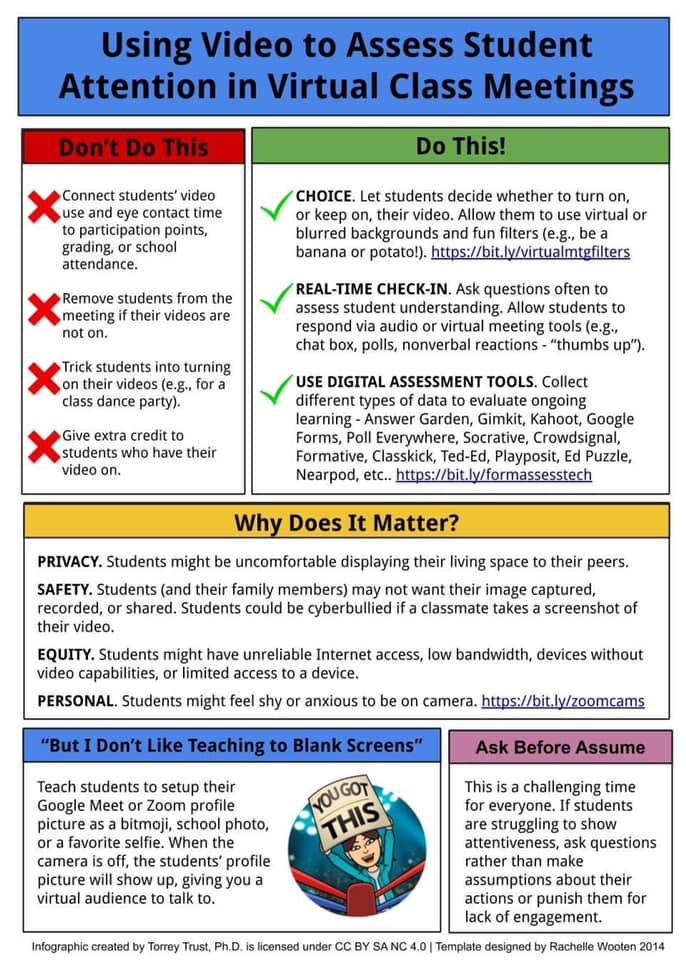
- For Instructors: Do's and Don'ts of requesting students to have video set to "on"
Tools for Engagement
- EMU@Lanc Faculty Training Zoom Session: Strategies for Building Community in Synchronous and Asynchronous Classes
- Breakout Rooms in Zoom: Source: content is licensed under a Creative Commons Attribution-NonCommercial 4.0 International License by the Trustees of Indiana University .
- Zoom Polls: Source: Zoom HelpCenter
- Jamboard
- How to accomplish your desired activity: Instructional Strategies Chart (Source: main campus staff and faculty, adapted from SUNY)
Assessing Student Learning
- Student Learning Outcomes: Source: content is licensed under a Creative Commons Attribution-NonCommercial 4.0 International License by the Trustees of Indiana University.
- Tips for giving feedback (Source: EMU Writing Program, 2017)
Discussion Board
To access the Faculty Discussion Board, you will need to first login to Moodle. This faculty discussion board is a resource for interacting with your peers for the purpose of sharing ideas. The goals are to:
- Provide a forum for sharing ideas
- Provide a place to post a question or request help